You're probably here because one of two things happened.
You tried an AI builder, got a slick demo in minutes, and then hit the ugly part. Auth broke after a small change. The database looked connected until you tried real records. The export technically existed, but it wasn't something you could run outside the platform.
Or you haven't started yet, and you're trying to avoid that mess.
The no-code AI platform market was valued at $6.56 billion in 2025 and is projected to reach $75.14 billion by 2034, a projected 31.13% compound annual growth rate according to Hostinger's AI app builder statistics roundup. That tells you this category is real. It does not tell you which tools will get you to a working app you can launch without hiring a developer.
The difference between a useful AI powered no code app builder and a toy is simple. Can you ship the app, keep the app, and survive the build process without getting financially or technically trapped?
The Moment Most Founders Realize Their AI Builder Will Not Ship
It's usually late. Not because founders enjoy drama, but because solo builders work after everything else is done.
You've got a launch date on Monday. It's Thursday night. The landing page looks good, the dashboard mostly works, and you're close enough to taste it. Then the last credit pack disappears in the middle of a fix. You ask for one small change to the signup flow. The builder rewrites three screens, the auth state regresses, and now invited users can't reach the app.
That's the night most founders finally understand what they bought.
The demo was never the product
A lot of tools are excellent at first-pass output. They generate a homepage, a sidebar, maybe a CRUD dashboard, and they make you feel fast. That part matters. Independent research on generative AI for software development shows real productivity gains. One study across 4,867 developers found access to a generative AI code suggestion tool increased completed tasks by 26.08%, another reported developers finished tasks 55.8% faster with GitHub Copilot, and McKinsey reported AI can cut some coding work to about half the time in areas like documentation, new code, and refactoring in McKinsey's developer productivity report.
That speed is why these tools are compelling in the first place.
But speed at the start is not the same as survivability at the end.
Pretty screens fail quietly. Broken auth fails publicly.
The founder failure pattern
The same pattern keeps repeating:
- Credits run out during iteration because debugging costs more than drafting.
- Exports disappoint because the “code” is incomplete, coupled, or dependent on the vendor runtime.
- Deploy gets blocked because production features sit behind a pricing wall you didn't notice early.
- Backend logic drifts because each prompt fixes one thing and destabilizes two others.
That's why feature checklists are mostly useless. I don't care if a builder says it supports prompts, themes, agents, or one-click UI generation. I care whether a stranger can sign in, hit the database, complete the core workflow, and let me own what I built after launch.
If your goal is a working web app, those are the only questions that matter.
What an AI Powered No Code App Builder Actually Does
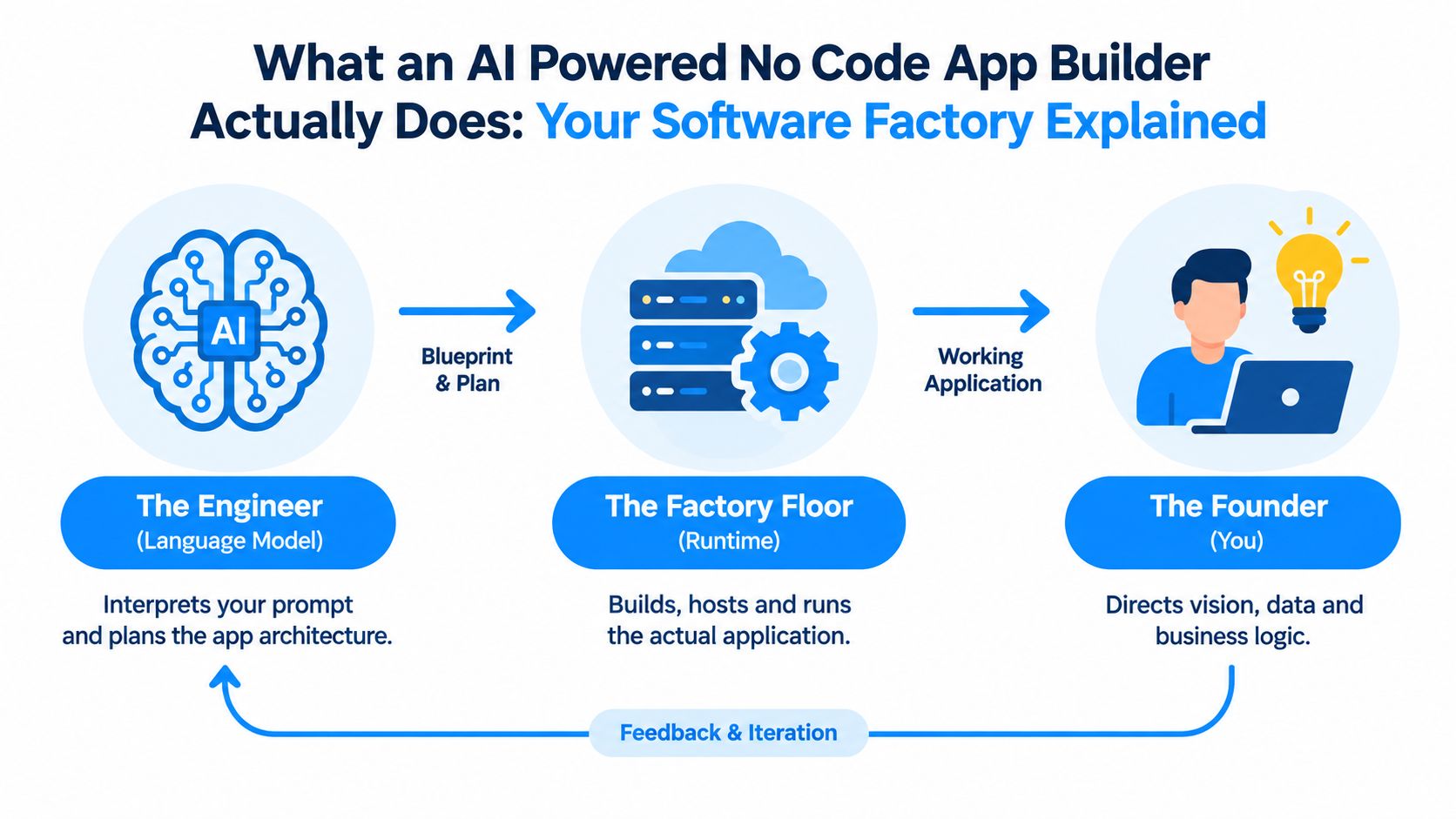
An AI powered no code app builder is a software factory. The language model acts like the engineer, the runtime acts like the factory floor, and you act like the product owner telling the system what to build in plain English.
That sounds abstract until you split it into parts. Every builder in this category, no matter how it markets itself, relies on the same four layers.
The prompt layer
You type what you want. Good builders let you be specific about pages, roles, flows, and data behavior. Weak builders turn a vague prompt into a vague app and force you to keep prompting until the whole project becomes expensive glue work.
If you're still comparing tools, a practical shortlist like this roundup of best AI app builders is useful because it shows how different products frame the same promise.
The generated code layer
This is the first trap.
Some platforms generate real source code you can inspect and work with. Others generate something closer to a proprietary representation that only fully works inside their system. The UI may look identical in both cases, but the ownership outcome is not the same.
If you want to see a builder designed around prompt-to-app workflows for non-technical founders, look at Webtwizz AI app builder.
The data layer
Most no-code promises start getting shaky here. The app needs schemas, storage, relationships, permissions, and often API calls. “Anyone can build software now” collides with state, validation, and user access.
A founder should always ask two questions:
- Where does the data live
- Who controls the schema and access rules
If the answer is “inside the platform, somehow,” you're already taking on migration risk.
The deployment layer
The thing either becomes a product or stays a preview.
A real deploy path means you can push to a live environment, attach a domain, configure secrets, and trust the app to stay up for users. A fake deploy path is a polished preview URL that feels live until you need production basics.
Practical rule: Don't judge a builder by the first render. Judge it by what happens when you need auth, data, and a live domain on the same day.
How AI Generation Works and Where It Breaks
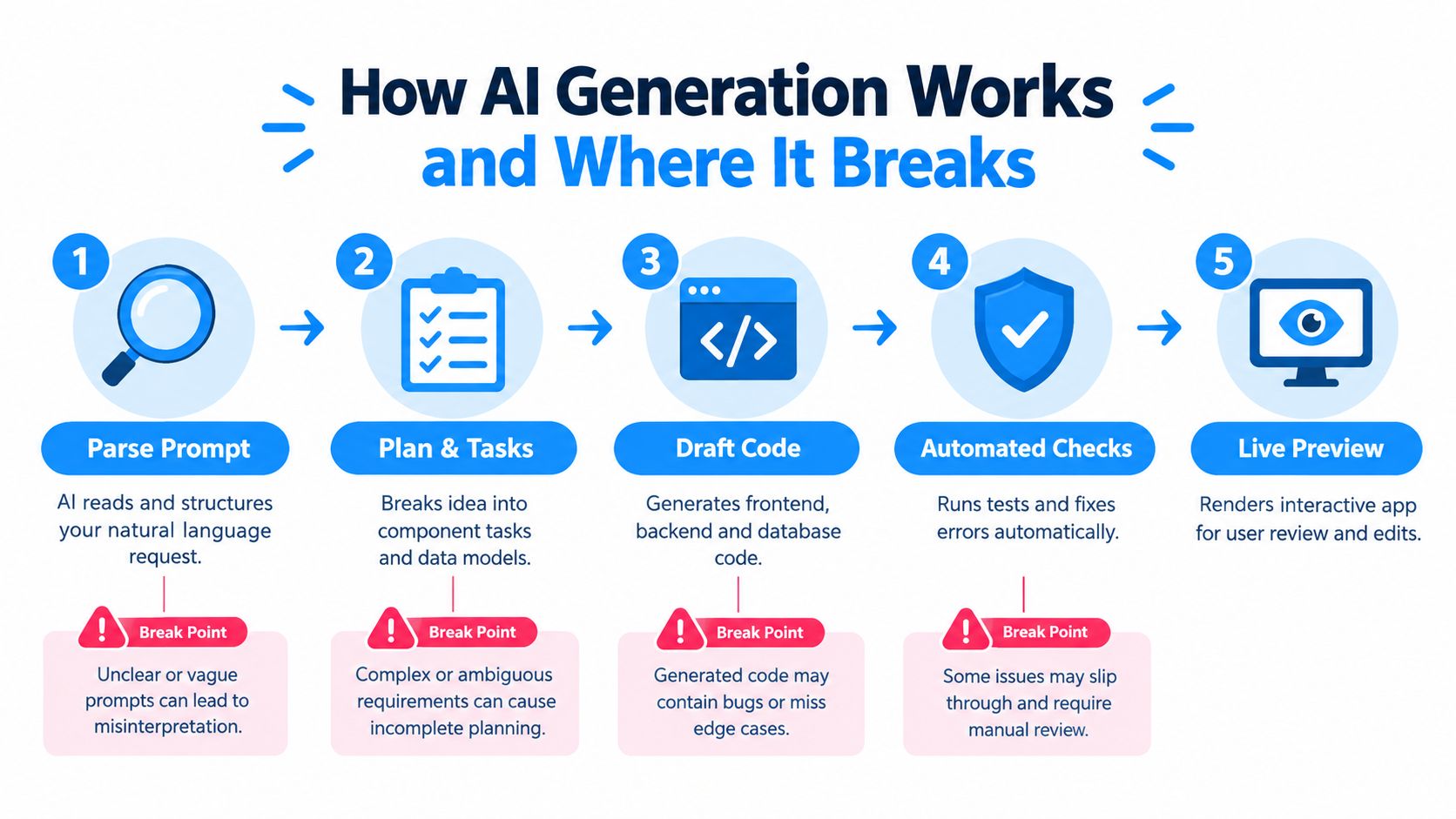
The generation loop is less magical than the marketing suggests. The system reads your prompt, turns it into a plan, breaks that plan into tasks, drafts code, runs automated checks, and shows you a preview. Then you ask for changes, and the cycle repeats.
That loop is why these tools feel addictive. You get feedback fast. You feel momentum. You can go from blank screen to rough product in a single sitting.
The part that works
For small surfaces, AI generation is strong at:
- Scaffolding interfaces
- Creating repeated patterns
- Drafting common flows
- Filling in routine code paths
That's enough to make a founder feel like software just became accessible. In many ways, it has.
This walkthrough helps if you want a visual sense of the process before you pick a tool:
The part that breaks
The main bottleneck is coherence, not page generation. A 2026 industry review found that databases, authentication, and coherence on bigger projects remain persistent weak points across major AI app builders, and independent testing also found some exported code stays tightly coupled to platform-specific component libraries and deployment pipelines in the MindStudio review of AI app builders.
That matches what founders run into in the world.
You update one table name and a filter breaks on another screen. You add role-based access and a previously working admin page starts throwing permission errors. You revise a dashboard widget and a route built two iterations ago stops resolving shared state.
Why bigger apps drift
The more your app grows, the more cross-file consistency matters. The model has to keep track of naming, dependencies, auth assumptions, data structures, and deployment behavior. Prompting helps, retrieval helps, and better context management helps, but all of them decay as the project expands.
Here's what that means in practice:
- A simple app tolerates loose generation
- A serious MVP needs stable backend assumptions
- A customer-facing product needs repeatable edits without regression
That's why the winning question isn't “Can this builder generate my app?” It's “Can this builder keep the app coherent after ten rounds of real changes?”
Five Criteria That Decide If Your App Will Actually Launch
Ignore the homepage claims. Score every AI builder on five things and you'll spot the ones that survive founder pressure.
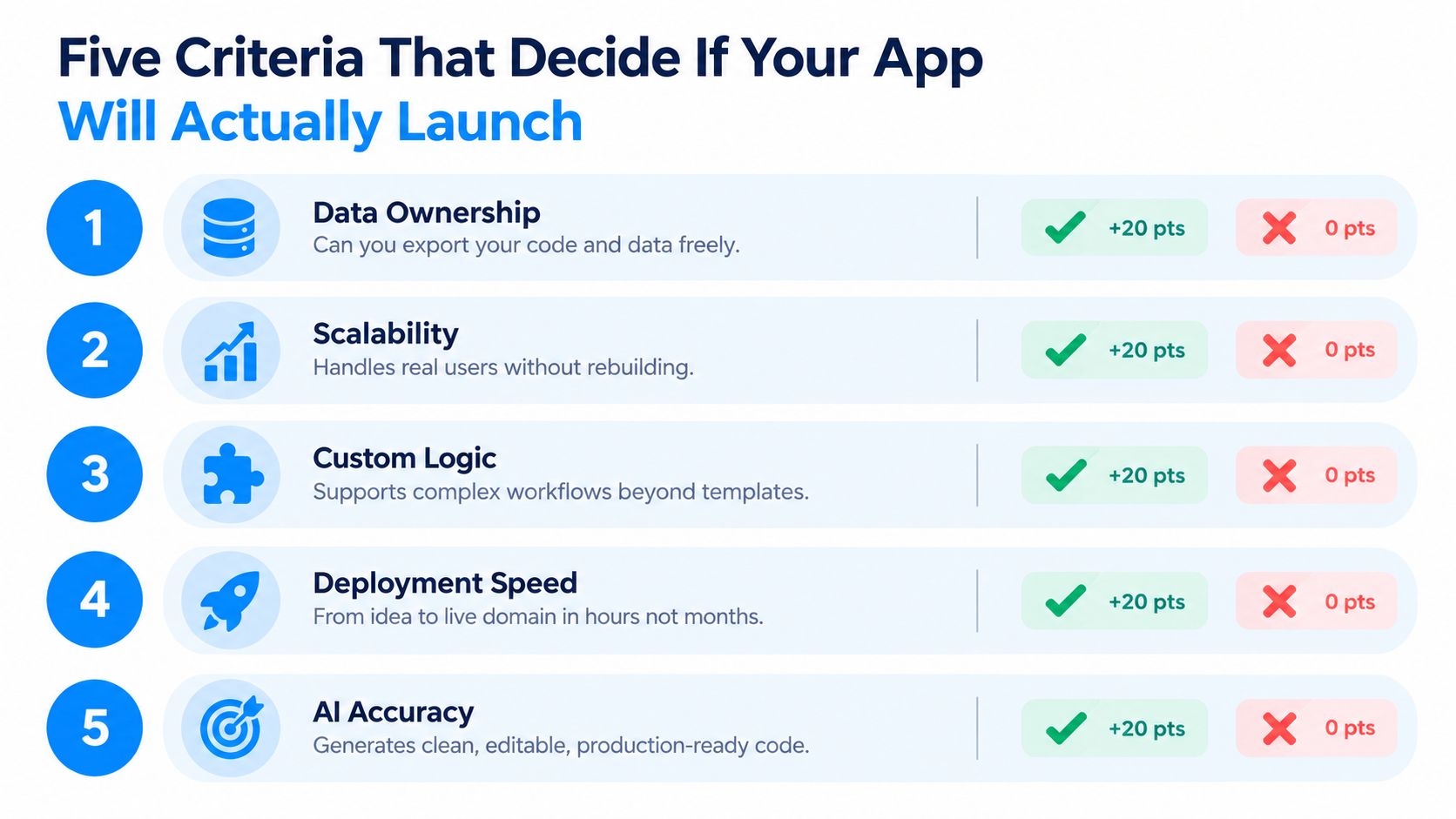
Code ownership
This is first for a reason. Code export is not the same as app ownership. Independent guidance on code ownership defines ownership as being able to access, download, and independently deploy the source code, and it recommends checking the dependency manifest, counting vendor-specific packages, and confirming the app still works outside the builder ecosystem in this code ownership guide.
If the app can't be cloned into a clean directory, run locally, and redeployed on infrastructure you control, you don't own the product in any meaningful sense.
Credit predictability
A lot of founders underestimate this one until it hurts.
The issue isn't whether a tool has a free tier. The issue is whether you can estimate the cost of iteration. If a redesign, bug hunt, or prompt-heavy cleanup burns through credits unpredictably, your timeline becomes hostage to billing mechanics instead of product progress.
Visual editing depth
Good visual editing means you can adjust layout, spacing, component behavior, and presentation without asking the model to regenerate half the screen. Weak visual editing means every small change goes back through the AI and risks collateral damage.
That's a hidden cost. It wastes both time and credits.
Deploy path
A preview link is not a launch path.
You want a builder that gets from draft to production without weird friction. Domain connection, secrets, and a clean promotion flow matter more than flashy mockups.
Backend reliability
Many projects die. Existing coverage often focuses on interfaces, but the ugly truth is your MVP usually fails on stateful behavior, not styling.
A useful way to pressure test any builder is this checklist:
- Auth check. Can a new user sign up, log in, log out, and recover a session cleanly?
- Data check. Does real data survive create, update, delete, and filtered views without drift?
- Job check. If the app sends webhooks, notifications, or background actions, do they keep working after edits?
- Exit check. If you stop paying today, what exactly can you take with you?
The first version only needs to be impressive enough to show. The launch version needs to be boring enough to trust.
Where Webtwizz Fits Against Lovable, Bolt, v0, Base44, and Replit
If you're comparing builders, don't compare them by vibe. Compare them by the first failure mode you're likely to hit.
The comparison that matters
| Builder | Code Ownership | Credit Predictability | Visual Editing | Deploy Path | Backend Reliability |
|---|---|---|---|---|---|
| Webtwizz | Export-focused and intended for self-hosting workflows | Predictable per-message model | Strong for no-code editing after generation | Built for live publishing flow | Better fit when backend consistency matters |
| Lovable | Export exists, but portability needs scrutiny | Iteration can become expensive | Strong UI output | Smooth for demos and early sharing | Risk rises as app logic grows |
| Bolt | Can move fast, but portability varies by setup | Costs can climb during repeated prompting | Good for rapid interface work | Fast early deployment | Can get shaky under heavier app state |
| v0 | Better treated as a component generator | More manageable for small UI tasks | Good at component-level refinement | Not ideal as a full app launch path | Not built to carry a full product backend |
| Base44 | Export and ownership concerns are more pronounced | Credit pressure shows up quickly for prompt-heavy work | Fast first draft experience | Convenient inside its own environment | Limited depth for more demanding backend needs |
| Replit | Powerful, but runtime dependence is a real consideration | Usage can be hard to forecast for non-technical founders | More code-centric than visual | Strong if you're comfortable in its environment | Agent power is real, but lock-in trade-offs remain |
Where each tool breaks first
Lovable usually impresses people fast. The UI comes out polished. The problem starts when the app needs to stay coherent under repeated changes and you begin caring about what happens outside the platform.
Bolt is similar in the sense that it can get you momentum quickly. The friction shows up later, when iterative debugging starts costing more than initial generation and the project stops feeling cheap.
v0 is useful. I just wouldn't call it a full app builder for most founders. It's closer to a component and interface generator. Great for marketing surfaces, rough product shells, and snippets. Not where I'd want to depend on full product logic.
Base44 is attractive for quick internal-tool drafts, but the trade-off gets more obvious once backend depth and long-term portability matter. That lines up with broader ownership benchmarking that found big spreads in portability outcomes across leading tools, with Base44 lagging behind export-first options in Builderproof's portability leaderboard.
Replit gives you more raw power than many no-code-first tools, but it asks more from you. If you don't want to think like a developer at least part of the time, you'll feel that quickly.
Where Webtwizz fits
Webtwizz fits the founder who cares less about flashy first drafts and more about shipping a web app they can keep. That means readable app code, self-hosting options, clearer credit behavior, and a path to a real deployed product without rebuilding from scratch later.
That won't make it right for every project. If all you need is a marketing prototype or a single polished frontend surface, another tool may be enough. If ownership, hosting, and backend stability are your deal-breakers, this is the lane where Webtwizz belongs.
Building an Internal Tool MVP in Webtwizz From Prompt to Domain
Let's keep this concrete. Say you need a customer-feedback triage dashboard for your team. Not a concept. A real internal tool with Slack auth, a Postgres table, and different views for managers and agents.
Start with one prompt:
Build a customer feedback dashboard with Slack login, a Postgres table for feedback items, role-based views for agents and managers, status filters, and a detail page for notes and resolution tracking.
That's enough to define the initial shape of the app if your requirements are clear.
Start small and specify the workflow
Practical guides for non-technical founders recommend writing explicit feature requirements, defining milestones, and testing the smallest working version early instead of waiting for a full launch, as outlined in this no-nonsense founder guide.
That advice matters more with AI builders than with agencies. Vague prompts create vague software.
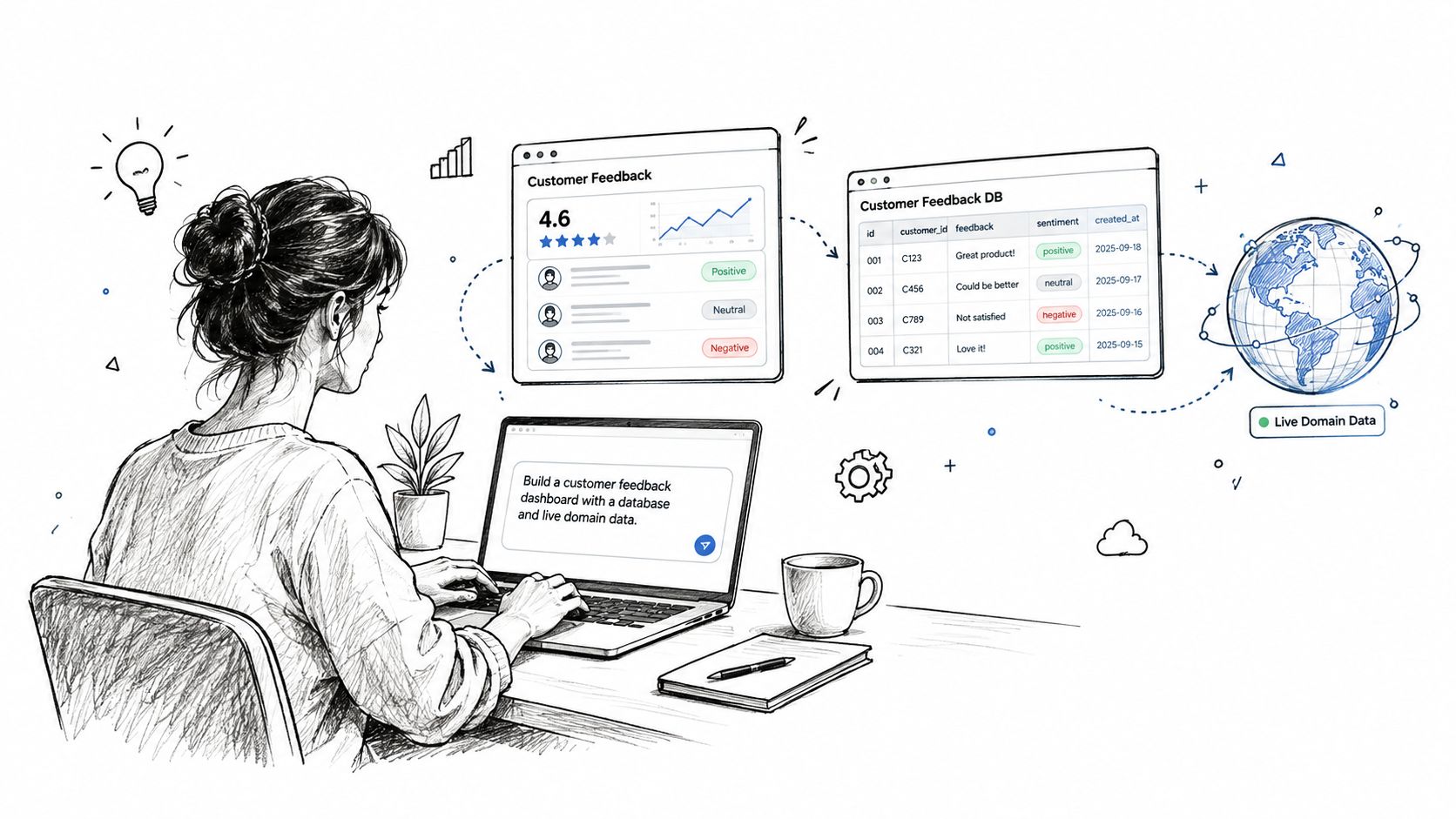
A sensible first build should give you:
- Core pages like login, dashboard, detail view, and admin view
- A visible file tree so you can inspect what exists
- A schema layer where the feedback table and fields are editable
- A visual editor for spacing, layout, and brand adjustments without another prompt
If you need help tightening your instructions before the first prompt, use this prompt engineering guide for app building.
Add one production feature at a time
Once the first version works, add the next change with a narrow follow-up:
Add a sentiment score column to the feedback table and create a Slack webhook that posts items marked urgent to a manager channel.
Weak builders often break older routes or permissions. A stronger workflow preserves the existing app while extending the data model and automation logic.
My sequence for validating the MVP is simple:
- Test auth first. Can both roles sign in and see the right views?
- Insert ugly data. Long text, empty fields, duplicate statuses. Real users won't behave politely.
- Edit visually. Fix spacing, labels, and hierarchy without sending the whole screen back through the model.
- Configure production settings. Add your API keys as secrets, connect the domain, and verify the preview behaves the same after promotion.
- Export and verify. Pull the code, run it locally, and confirm the app is portable before inviting anyone else.
If your exported app only works when the builder is still holding the backend together, you haven't finished building. You've rented a dependency stack.
A non-technical founder doesn't need to become a full developer to do this well. But you do need to think like a product owner. Small scope, clear prompts, fast validation, then production checks before you celebrate.
Code Ownership, Credit Predictability, and the Hidden Migration Tax
You usually discover the cost of an AI builder late. The prototype looks good. The team is excited. Then you try to export, wire up production, or fix one broken flow after you have burned half your monthly credits. That is the moment the builder stops feeling like a shortcut and starts acting like a lease.
Code export is only part of the decision. What matters is source code ownership you can use. If the app depends on the platform's private runtime, hidden backend services, or a deployment setup you cannot recreate yourself, you do not own much. You have a demo with a trap door under it.
Three checks before you commit
Run these checks before the app gets real stakeholders and real data.
- Verify the live code path. Confirm the code you can export is the same code running in production. Some builders give you an output artifact, not the actual app stack.
- Start it outside the platform. Put the project in a clean local environment and see what breaks first. Missing environment setup is normal. Hard dependency on proprietary services is the red flag.
- Stress the credit model. Do not read pricing like a landing page. Read it like someone debugging auth at 2am. Check what happens when you regenerate screens, roll back mistakes, test variants, and hit usage spikes.
One failed check is enough to slow down or switch tools. Do it early, while walking away is still cheap.
Migration cost shows up as rework
The expensive part of lock-in is not the subscription. It is the rebuild you did not plan for.
A dead prototype wastes more than time. You rebuild auth, reconnect the database, recreate automations, fix prompts that only worked inside one vendor, and explain to your team why the app that looked finished last week is back in pieces. Founders call this migration. In practice, it is redoing paid work under deadline.
Analysts at Taskade describe the broader pattern in their state of AI app building report. Plenty of users can generate working first versions. Fewer get to stable production apps. That gap matters more than any feature grid.
Use a harder rule:
Required check: If pricing gets unpredictable or the app cannot leave the platform cleanly, treat the prototype as disposable.
Cheap credits and fast generation are seductive. Keeping what you build matters more.
Your Next Step and the Decision Framework in One Page
It usually falls apart in a boring moment. You try to change one workflow, fix one auth edge case, or push one deploy before sending the link to a customer. Then the builder asks for more credits, blocks a code export, or turns a simple edit into a full regeneration. That is the point of this whole evaluation.
Use one page. Make one decision.
Score every AI powered no code app builder with these five questions, in this order:
- Does the generated code run outside the platform without major surgery?
- Are credits predictable while debugging, regenerating, and testing variants?
- Can I edit screens and logic directly without re-prompting core parts of the app?
- Can I deploy to a real domain without hidden production blockers?
- Will the backend hold up under real auth, real permissions, and real data?
The order matters. If a tool fails on code portability or cost predictability, stop evaluating. You do not have a product base. You have a rented demo.
Then run a small test that looks boring on purpose. Build an internal tool first. A feedback dashboard, ops tracker, approval queue, or lightweight CRM will expose the problems fast. These apps force the builder to handle forms, tables, auth, permissions, and deployment in one pass. If the tool struggles there, your customer-facing app will struggle more.
Keep one distinction clear. Source code export and data export are different things. A vendor can let you pull records out by CSV or API and still keep the actual application trapped inside its platform. If that happens, leaving means rebuilding.
The right next step is simple. Open Webtwizz and build one small internal tool in a single session. Use a prompt that includes auth, one table, and one real workflow. Push it to a live domain. Then check two things immediately: whether you still control the code, and whether another round of fixes burns credits at a rate you can live with.
That is the framework.
Pick the builder that lets you ship, fix mistakes, and keep what you built. Ignore the one that only looks good in the first ten minutes.
Last updated: September 20, 2026