
Your app probably doesn't need “SMS sending.” It needs a way to tell a real person that something just went wrong, changed, or needs action, and it needs that alert to survive contact with opt-outs, carrier filtering, retries, and messy user data.
That's where most founders get tripped up. They add a button that calls an SMS API, test with their own number, see one message arrive, and assume the feature is done. Then the first real incident hits. A canceled booking goes to the wrong contact. A failed payment alert sends twice. A customer replies STOP and still gets the next message. Nobody on the team can prove what was sent, when it was sent, or whether the provider ever confirmed delivery.
Why Most SMS Alert Ideas Fail Before the First Message
The failure usually starts earlier than people think.
A founder wants alerts for one sharp use case. Server down. Appointment canceled. Order delayed. Fraud check failed. They open an AI builder or a no-code tool, prompt for “send SMS when X happens,” and the tool gives them exactly that. A form, a trigger, an API call. It looks finished because the happy path works.
It isn't a system yet.
A send button is not an alert product
An SMS alert system has to answer four questions before the first live message goes out:
- Who can trigger an alert
- Who is allowed to receive it
- How the app records what happened
- How the app stops future sends after opt-out
If any one of those is vague, the app breaks in production. The technical part is often the easiest piece. The hard part is turning a one-off notification into a product behavior people can trust.
Practical rule: If you can't show a timeline for one alert from trigger to provider response to final status, you haven't built an alert system. You've built a demo.
That's also why SMS shouldn't be treated like a marketing add-on. It behaves more like infrastructure. Historically, SMS itself started as an operator alerting technology, not as a consumer chat tool. The concept was proposed in 1984, the first SMS was sent on 3 December 1992, and the first commercial SMSC deployment followed in 1993. In the UK, cross-network texting in 1999 widened consumer use, and by 2001 monthly UK text volume had passed 1 billion messages (SMS history details). The pattern matters. SMS became massive because it worked as a reliable notification layer, not because it was cute or novel.
What a working build needs from day one
If you're building this without hiring a developer, the first job is narrowing the feature to one alert flow and giving it governance.
For example:
- Booking app: only staff with an operations role can trigger cancellation alerts
- SaaS app: only events tagged critical can page customers by SMS
- Logistics app: only orders with confirmed phone consent enter the alert list
A useful implementation guide is to think in product states, not screens. The app needs a trigger, a recipient record, a message record, a send attempt, and a suppression rule. That's the level where bugs show up.
If you want a clean foundation before wiring providers, Webtwizz's guide to SMS integration patterns is the kind of reference worth reviewing because it keeps credentials and trigger logic out of the UI layer.
Core Building Blocks of a Reliable SMS Alert System
Most bad builds collapse everything into one workflow. A trigger fires, the app renders text, calls a provider, and hopes for the best. That's fragile. Burst traffic, malformed data, and callback failures all hit the same path.
A better mental model is three separate jobs.
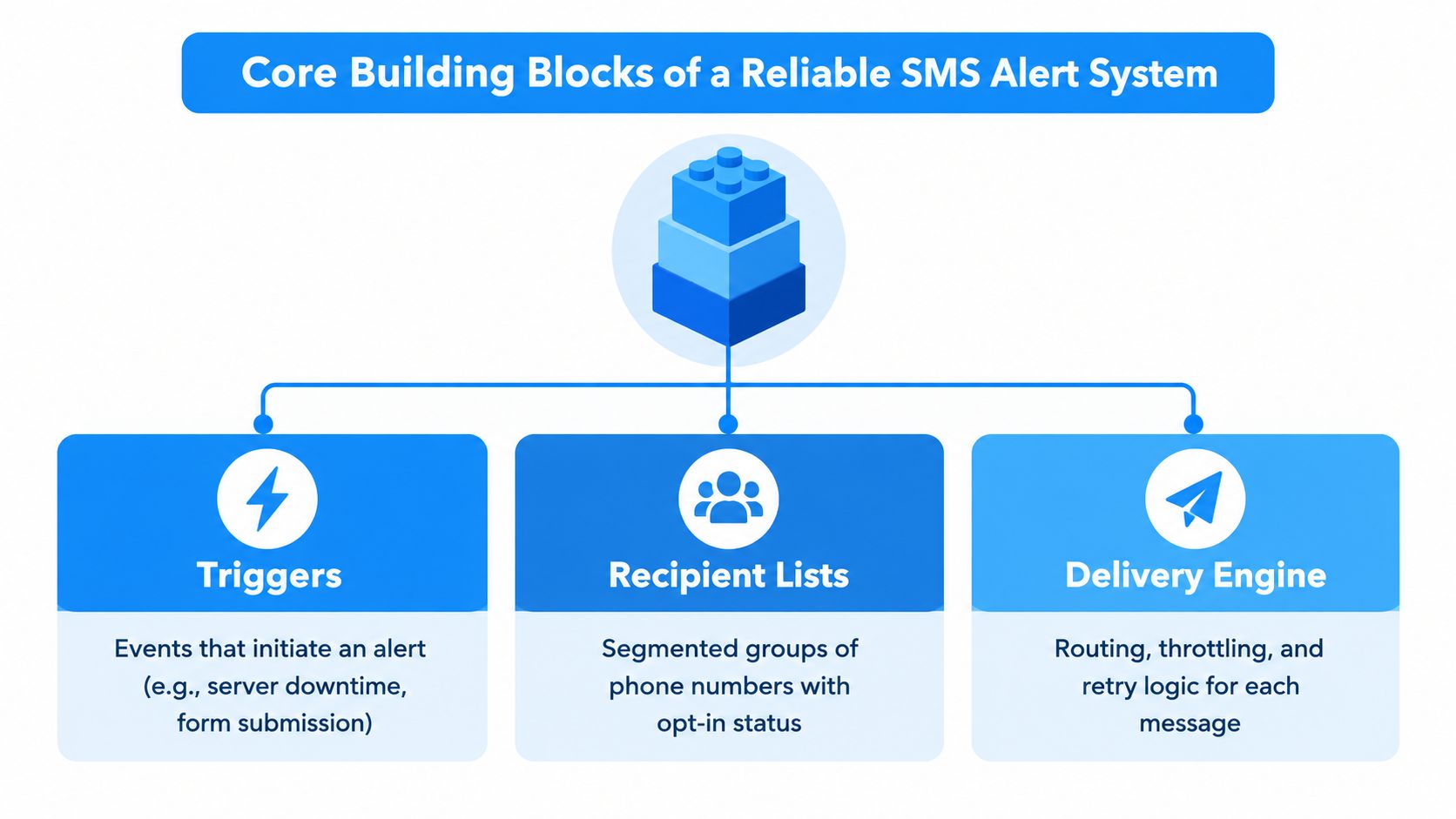
Split the system into jobs
1. Trigger intake
Your app decides an alert should exist. It can come from an internal event, an admin action, a failed payment state, or a schedule. Keep this layer narrow. It should create an alert record, not send the text directly.
2. Recipient and policy check
Before dispatch, the app should verify the recipient is eligible. That means checking phone format, consent status, quiet hours if you support them, and whether the message type is still allowed. This is also where you decide if one trigger should fan out to many people or only one contact.
3. Delivery engine
This layer sends, retries, and records provider responses. It should work off a queue or staged job list, not the page request that created the alert.
Don't let a user clicking “Send outage alert” wait on every carrier hop and webhook response. The app should accept the request, record it, and hand delivery to a worker flow.
That separation isn't just theory. In independent disaster-alert system testing, an SMS pipeline with parallel worker processing scaled to approximately 700 messages per second at 16 workers, with around 10.13 ms per message for end-to-end verification and P99 latency below 60 ms. The practical lesson was to decouple message generation, verification, and dispatch into asynchronous stages so burst traffic doesn't block alert issuance (disaster-alert SMS pipeline testing).
The records you actually need
Founders often ask an AI builder for “an alerts dashboard.” That's too vague. Ask it to create tables and statuses that match reality.
Store at least:
- Recipients with phone number, consent state, opt-out timestamp, and list membership
- Templates with message body, variables, purpose, and version
- Alerts with trigger source, priority, created time, and actor who triggered it
- Send attempts with provider message ID, send time, status, error payload, and callback updates
- Suppression entries for opted-out numbers or blocked message types
For inspiration, look at systems outside pure alerting too. A contractor-focused workflow like text message marketing for HVAC pros is useful because it shows how segmented lists, triggers, and operational follow-up matter more than the message field itself. The product lesson carries over even if your use case is alerts, not promotions.
Statuses users can trust
Most non-technical founders stop at “sent.” That's not enough. Your app should show:
- Queued
- Sent to provider
- Delivered
- Failed
- Opted out
- Reply received
If you don't persist those states, support becomes guesswork. A customer says they never got the alert. Your team checks the dashboard. If all it says is “done,” nobody knows whether the provider accepted it, whether the carrier dropped it, or whether the number had already opted out.
For a broader architecture lens, Webtwizz's piece on building a notification system across channels is helpful because it treats SMS as one delivery path inside a tracked event flow, not as a fire-and-forget utility.
Choosing a Provider and Sender Identity Without Guesswork
Provider selection gets weirdly overcomplicated. Most comparisons obsess over per-message pricing and country lists. For alert apps, that's not the main risk.
The question is whether your messages will keep landing once you move from test traffic to production traffic under carrier rules.
What changes the decision
In the U.S., sender identity matters enough that it should drive your build order. A2P 10DLC is the carrier framework for application-to-person texting on 10-digit long codes, and one industry source says major U.S. carriers began blocking unregistered 10DLC traffic starting February 1, 2025 (A2P 10DLC compliance note). If your app is meant to ship in the U.S., register the brand, campaign use case, and sending numbers before polishing templates.
That sounds administrative, but it changes product behavior. Registration shapes what traffic type you can send and how reliably it gets through. It also forces you to define what your app is doing. Alerts. Login codes. Reminders. Support updates. Those are not interchangeable categories.
Delivery quality beats cheap routes
Independent benchmarks cited for A2P SMS alerting in major markets show roughly 95–99% delivery for compliant, registered senders, while unregistered or non-compliant traffic can drop to about 40–80% delivery, especially when carrier filtering is triggered (A2P deliverability benchmarks). That's the cleanest reason not to mix urgent alerts with fuzzy promotional content or unregistered routes.
A few provider checks matter more than their feature grid:
| Criteria | What to Check | Why It Matters for Alerts |
|---|---|---|
| Sender registration support | Can you register brand, campaign, and numbers for your target market | Unregistered traffic is more likely to be filtered |
| Delivery callbacks | Does the provider post message status updates to your webhook | Your app needs visible sent, delivered, and failed states |
| Inbound SMS handling | Can the same setup receive STOP, HELP, and user replies | Alerts need opt-out and support flows, not just outbound sends |
| Route transparency | Can you test by country or route instead of assuming one global result | Latency and filtering differ by market |
| Encoding behavior | How the provider handles GSM-7 versus Unicode and segmentation | Message length and character set can change delivery behavior |
| Retry and webhook docs | Are callback retries and failure states documented clearly | Silent callback failure leaves your dashboard wrong |
| Error visibility | Can you inspect carrier or provider error codes in logs | You need something actionable when delivery drops |
Encoding is a product decision too
Founders usually discover GSM-7 versus Unicode after weird billing or deliverability behavior appears. If your alert includes smart quotes, emojis, or non-Latin characters, the provider may treat the message differently and split it into more segments. That can affect both cost and filtering risk.
Keep alert content plain where possible. Short, direct, policy-clean messages perform better operationally than clever copy.
A practical outside example is payment-aware SMS triggers. Even though it's framed around platform selection, the useful takeaway is that SMS often needs to react to transactional state changes, not just campaigns. That's the right lens for alert apps too.
Pick the provider that makes registration, callbacks, inbound handling, and route testing obvious. Cheap SMS that never lands is expensive software.
Templates Scheduling Replies and Opt Outs That Keep You Compliant
Once the provider is picked, the next place apps go off the rails is message behavior. A reliable SMS alert system doesn't just send text. It decides what text is allowed, when it's allowed, how often it's allowed, and what happens when somebody replies.
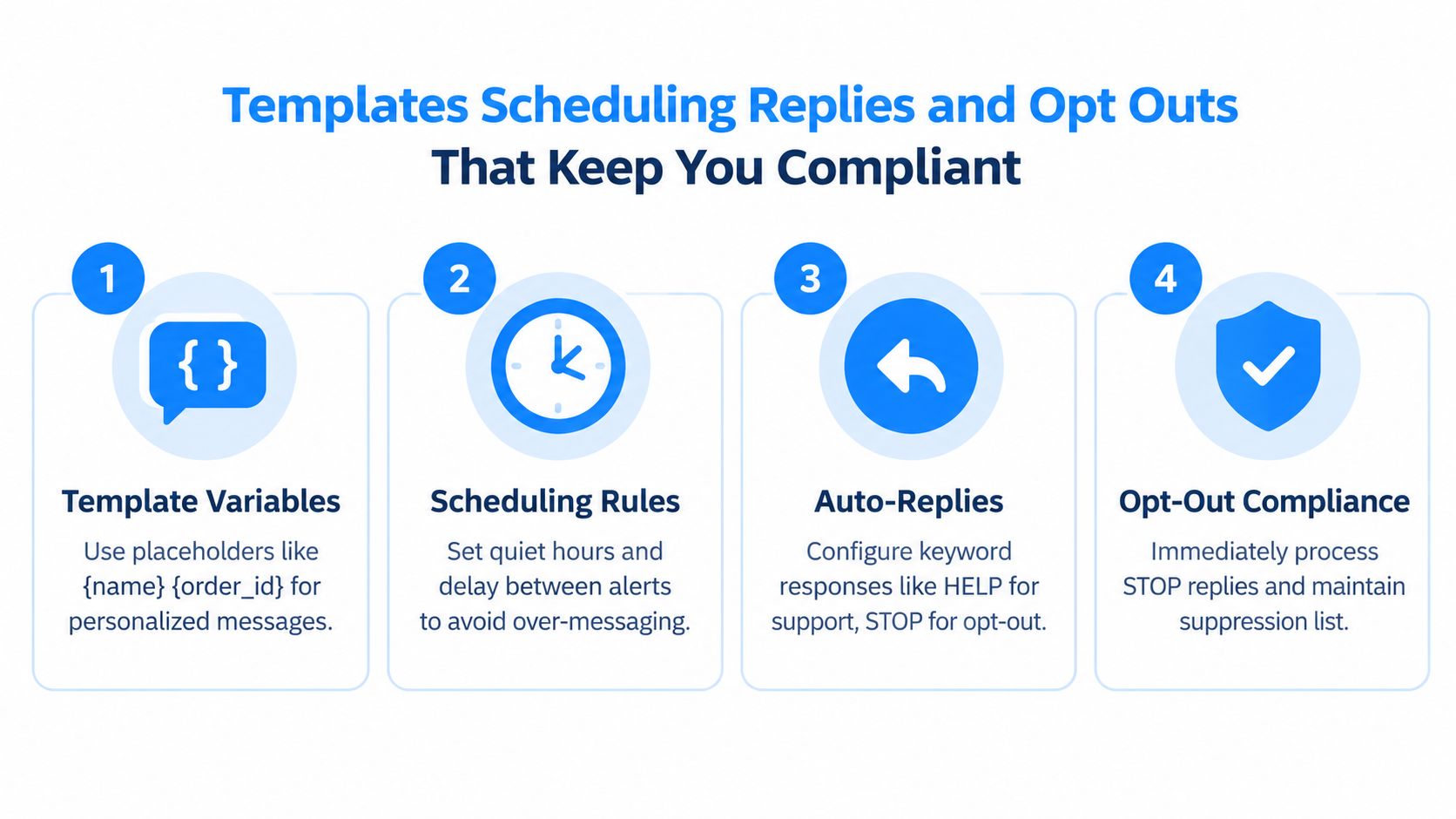
Build templates like records, not copy fields
A template should be a structured object in your app, not a text blob tucked into a settings page.
Store fields like:
- Template name
- Template version
- Message body
- Allowed variables
- Message purpose
- Language
- Created by
- Approved at
- Scheduled time if delayed
- Throttle rule
- Disabled status
Alert wording affects response. A systematic review of mobile alerting found that alerts should be sent infrequently and only for real need, because repeated or low-value messages can desensitize recipients. It also found people are more likely to act when alerts include clear instructions, specific threat or location details, and ways to confirm the message through other channels (mobile alerting governance findings).
That should push your prompt design in a specific direction. Don't ask an AI builder for “editable message templates.” Ask for versioned templates with variables, approval state, and a usage log.
Scheduling and throttling protect trust
Urgent alerts shouldn't become a spam cannon. Add scheduling and suppression rules even in a lean MVP.
Useful controls include:
- Quiet hours for non-critical categories
- Per-recipient cooldowns so one event loop doesn't hammer the same number
- Duplicate suppression for repeated triggers on the same object
- Escalation rules so unresolved events can move to another channel or operator
A good alert app prevents sends almost as carefully as it enables them.
If your system also handles customer communication, Webtwizz's guide to customer communication workflows is relevant because it treats timing, channel choice, and reply handling as product logic instead of just message output.
Replies and STOP handling can't be optional
Inbound SMS needs first-class handling. If someone replies STOP, your app should update the suppression state immediately. If they reply HELP, route them to a support instruction or inbox. If they send a free-text reply, it should land somewhere visible.
One API reference for webhook events documents states such as PENDING, RETRYING, and FAILED, and notes retry counts can range from 1 to 5 with a default of 3 (webhook event state reference). That's a useful reminder that inbound and status handling need retry-aware endpoints. Your app can't assume every callback arrives once and cleanly.
For AI-builder prompts, specify acceptance checks like these:
- STOP updates the database immediately and blocks future sends for that number.
- HELP returns a configured reply and logs the exchange.
- Inbound replies attach to the original alert or recipient record where possible.
- Every template send stores the template version used.
- Scheduled sends remain cancelable until dispatch starts.
Build Your SMS Alert System in Webtwizz Without Hiring a Developer
The concept becomes a shippable app.
If you've tried Lovable, Bolt, v0, or Replit for this kind of feature, you've probably seen the pattern. The prototype can render the UI, maybe even hit a provider API, but the minute you need callback handling, suppression state, exportable code, and a production admin flow, progress slows down. That's why some founders switch to tools that can keep the conversation tied to a working web app rather than a one-off generation.
Start by asking the builder for the app in product terms, not technical fragments.
The first prompt that gets you somewhere real
Use a prompt shaped like this:
Build an SMS alert web app with admin login, recipient lists, opt-in and opt-out status, versioned message templates, event-based triggers, scheduled sends, provider API integration, delivery status callbacks, inbound reply handling for STOP and HELP, and an audit log that shows who triggered each alert and what status it reached.
That one prompt is already better than “build me an SMS notifier” because it names the records and states that matter.
Then tighten the build with follow-up prompts:
- Create database tables for recipients, lists, templates, alerts, send attempts, inbound replies, and suppression entries.
- Add roles so only admins or operators can trigger high-severity alerts.
- Add dashboard filters for queued, sent, delivered, failed, opted out, and reply received.
- Add a provider settings screen where API credentials are stored securely and not exposed in the UI.
- Create public HTTPS webhook endpoints for delivery callbacks and inbound replies.
- Log raw provider callback payloads alongside normalized statuses for debugging.
What to test before you trust it
Don't go live after one successful text to your own number. Run a small acceptance pass that proves the product behaves like an alert system.
Check these flows:
- Manual alert trigger: create one alert from the admin panel and verify the audit log records the actor, timestamp, template version, and recipient count.
- Scheduled send: schedule an alert, edit it before send time, then cancel it and confirm no dispatch occurs.
- Delivery callback: confirm the provider posts status updates into the app and changes visible state from queued to sent to delivered or failed.
- Opt-out flow: reply STOP from a real phone and verify future sends are blocked.
- Inbound support reply: reply HELP and confirm your app stores the exchange and returns the configured response.
- Bad webhook behavior: simulate a callback failure and confirm the endpoint still handles retries.
Developer documentation from multiple SMS providers says delivery status is posted to a public HTTPS webhook and failed callbacks are retried with increasing delays, which is why the app should show sent, delivered, and failed states instead of making the user guess (delivery callback behavior overview).
A quick walkthrough helps if you want to see the kind of build flow that works before prompting your own app:
Where Webtwizz fits
For a non-technical founder, Webtwizz fits this project because it lets you describe the whole app in plain language, generate the working web app, connect provider APIs, and keep iterating without handing the build off to a developer. For this use case, the practical advantage is that you can build the alert dashboard, webhook endpoints, recipient management, and audit trail as one owned product instead of stitching together a prototype and hoping it survives production.
Ship It Today and Keep Alerts Deliverable
Shipping the first version isn't the finish line. SMS alert systems degrade when nobody watches deliverability, callback failures, and policy drift.
One benchmark source reports information-sector SMS delivery rates around 98 to 99% and open rates around 98% (SMS delivery and open benchmark). That's exactly why your app should store delivery status, failed status, and opt-out handling instead of assuming every message is seen. SMS is strong, but it still needs instrumentation.
The monitoring habits that matter
Watch three things every week:
- Carrier and provider errors so you catch registration, filtering, or content issues early
- Callback reliability so status updates don't stop reaching your app
- Message governance so teams don't turn urgent alerts into routine noise
For callback handling, retries should be part of the product, not an afterthought. If your webhook endpoint fails, the system should expect retries and surface failures for review. Exponential backoff is the sane default because it avoids turning a temporary outage into a bigger one.
Keep urgency rare and messages clear
The operational failure isn't technical. It's overuse.
If every late package, soft warning, and low-priority event becomes an SMS, people stop reacting. Keep alerts infrequent, useful, and direct. State what happened, who it affects, and what action the recipient should take next. If users can verify the message through another channel, say so.
One more thing matters in production testing. Don't judge the system on provider acceptance time alone. The disaster-alert pipeline work noted earlier warned that provider-side delivery receipts don't always reflect user-visible latency in real time, because carrier routing and downstream confirmation can still add delay. Benchmark send-to-carrier latency and receipt-confirmation latency separately, or you'll think the system is faster than the recipient experiences.
Before launch, run this final pass:
- Brand and campaign registration are complete
- Opt-in language exists where recipients enter the system
- STOP and HELP handling work on real devices
- Templates are plain, clear, and policy-clean
- Webhook retries and failures are visible in the dashboard
- Alert traffic is separate from promotional traffic
- You can export a clear audit history for any message
Build that, and you don't just have SMS sending. You have a product feature people can depend on.
If you want to move this from idea to a working app today, use Webtwizz to describe your SMS alert system in plain language and generate the recipient management, templates, webhook handling, and status dashboard in one build. It's a practical route for founders who need to ship the app, own the code, and stop waiting on a developer.
Last updated: September 21, 2026