You're sitting on a domain name, three Figma boards, and a Notes app full of features copied from Twitter. You don't need another brainstorm. You need to decide what a stranger will do inside your app, then ship that behavior before the idea gets buried under profiles, stories, video editing, and settings.
The practical answer to how to build a social media app starts with scope, not code. Social media reached 5.79 billion user identities worldwide by April 2026, representing 69.9% of the global population and 94.7% of internet users, according to DataReportal's social media user analysis. Users are already active across an average of 6.5 platforms each month, so launching another general-purpose feed won't be enough. Your app needs one narrow social loop that works immediately.
Why Most Social App Ideas Never Ship
Most founders treat a social product like a construction project. They ask which database to use, which AI builder to choose, and whether to build mobile or web first. Those decisions matter later. The first decision is sharper: which single behavior has to win during week one?
BeReal owned authenticity. Strava owned segments. Whisper owned anonymity. You don't need to copy their feature lists. You need to identify the specific reason a person posts, the reason another person watches, and the reason that watcher responds.
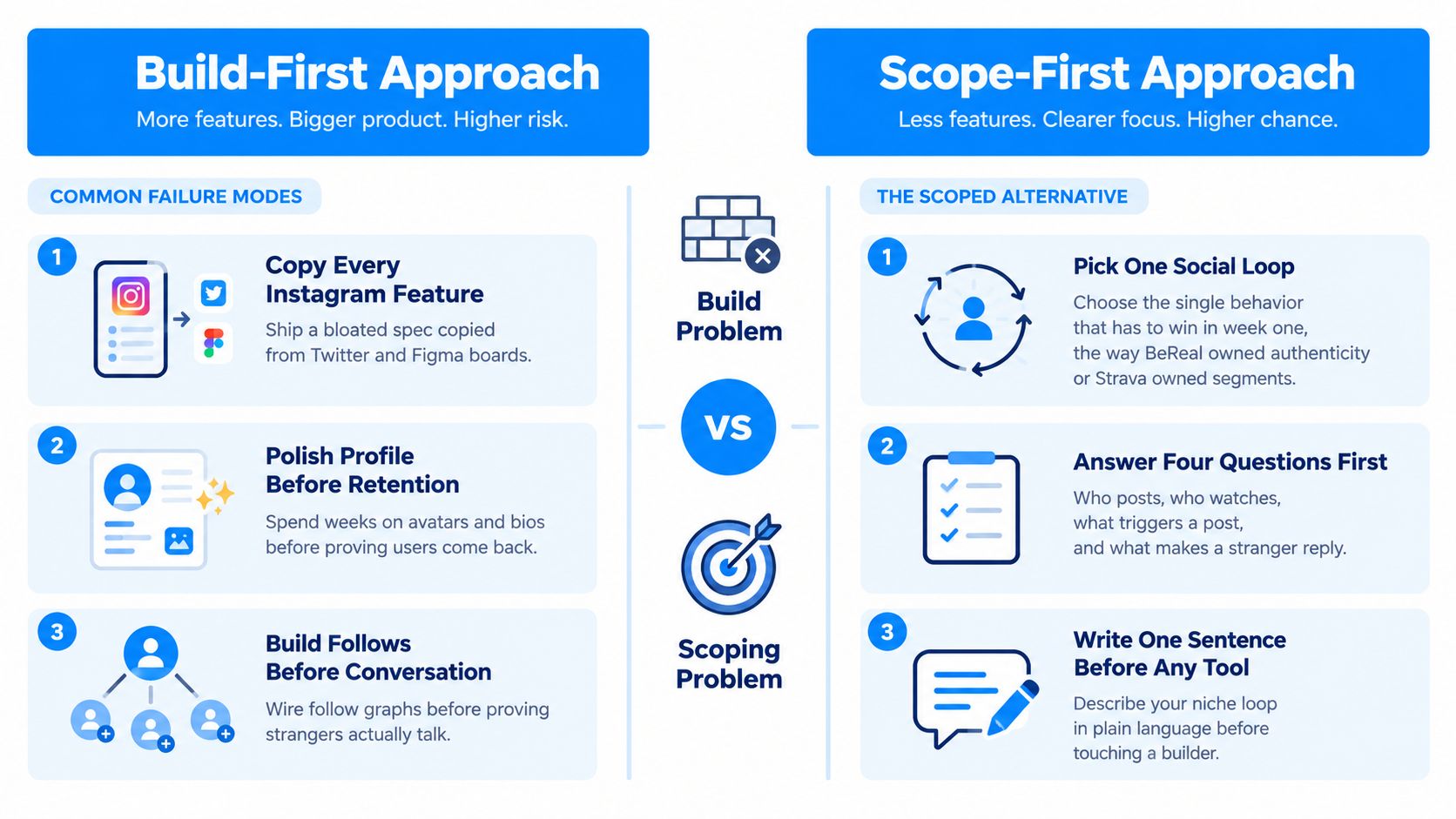
A social app usually dies in one of three ways:
- Copying every Instagram feature: The founder creates a bloated specification containing stories, reels, live video, filters, messaging, followers, shopping, creator tools, and several feed types.
- Polishing the profile before proving retention: The team spends time on avatars, bios, badges, and profile layouts before anyone has a reason to return.
- Building follows before conversation: The product wires a follower graph even though strangers haven't shown that they want to talk, react, or share something useful.
The market makes this mistake expensive. Users spend roughly 18 hours and 36 minutes per week on social platforms, according to DataReportal's global social media data. They already compare every new app with mature products that support identity, ranking, notifications, and constant activity. A weak first-session experience gets ignored quickly.
Practical rule: If you can't explain the first meaningful interaction in one sentence, you're not ready to build the app.
Write this sentence before opening an AI builder:
“For [specific group], [app name] helps users [post or do one action] when [trigger], so [another user type] can [responding action].”
Then answer four questions:
- Who posts? Name the person and their situation, not a vague audience such as “everyone interested in fitness.”
- Who watches? Decide whether the audience is friends, nearby members, experts, strangers, or a private group.
- What triggers a post? A completed run, an unanswered question, a local event, a daily prompt, or another repeatable moment.
- What makes a stranger reply? Shared context, useful knowledge, accountability, humor, or a direct request.
A credible starting sentence might be: “For local runners, PaceLoop helps users post a completed route after each run, so nearby runners can compare conditions and invite them to the next group session.” That sentence gives an AI builder something usable. “Build a better Instagram for active people” doesn't.
Use this guide to reducing time to market if your current project keeps expanding instead of shipping. The decision remains yours, though. Scope the loop today, or accept that the rest of the build is decoration.
The Core Features You Actually Need in v1
A social MVP needs less than most founders think, but it still needs a coherent data model. Start with five tables:
- Users: Identity, login details, handle, bio, and avatar.
- Posts: User-generated content and its creation time.
- Follows: The relationship between one user and another.
- Likes: A user's reaction to a post.
- Comments: Conversation attached to a post.
- Notifications: A recipient, an actor, an event type, and a read state.
The extra notification row matters because social feedback is not only a visual effect on the feed. It's an event that must be stored when the recipient is offline. Keep the first version relational and understandable. You're going to inspect, change, and troubleshoot this structure through an AI builder, so opaque abstractions create unnecessary pain.
Rank the seven classic features
Authentication belongs in v1. Use email and magic-link authentication. Skip phone OTP until abuse or account recovery data proves you need it.
Profiles also belong in v1, but keep them functional. A handle, short bio, avatar, and the user's posts are enough. Don't build a profile customization suite.
Posts are the product. Start with text and optionally one media attachment. Video processing, editing, drafts, and multi-asset carousels can wait.
Feed should be reverse chronological for the first release. It's transparent, easy to debug, and good enough to validate whether users create and consume relevant content.
Likes are cheap feedback. Ship them, but don't mistake a tap for community.
Comments deserve priority when conversation is your loop. Add basic reply handling later, not threaded discussion trees on day one.
Notifications should cover follows, likes, and comments. Store each event so offline users can recover it.
| Feature | Build Effort | Retention Impact | Ship In |
|---|---|---|---|
| Auth | Low | High | v1 |
| Profiles | Low | Medium | v1 |
| Posts | Medium | High | v1 |
| Feed | Medium | High | v1 |
| Likes | Low | Medium | v1 |
| Comments | Medium | High when conversation matters | v1 |
| Notifications | Medium | High | v1 |
| Stories | High | Unproven for a niche MVP | v2 |
| Video processing | High | Unproven before content demand | v2 |
| Direct messaging | High | High only when private conversation is the core loop | v2 |
| Algorithmic ranking | High | High after enough behavior exists | v2 |
The data shapes should be explicit even if you never write SQL:
Userhasid,handle,bio, andavatar.Posthasid,authorId,body,mediaUrl, andcreatedAt.FollowjoinsfollowerIdandfolloweeId.LikejoinsuserIdandpostId.Commenthasid,postId,authorId,body, andcreatedAt.Notificationhasid,recipientId,actorId,type,postId, andreadAt.
Your next prompt needs this level of precision. For account workflows and permissions, use the practical patterns in user account management, then remove anything your social loop doesn't need.
Describing the App to an AI Builder
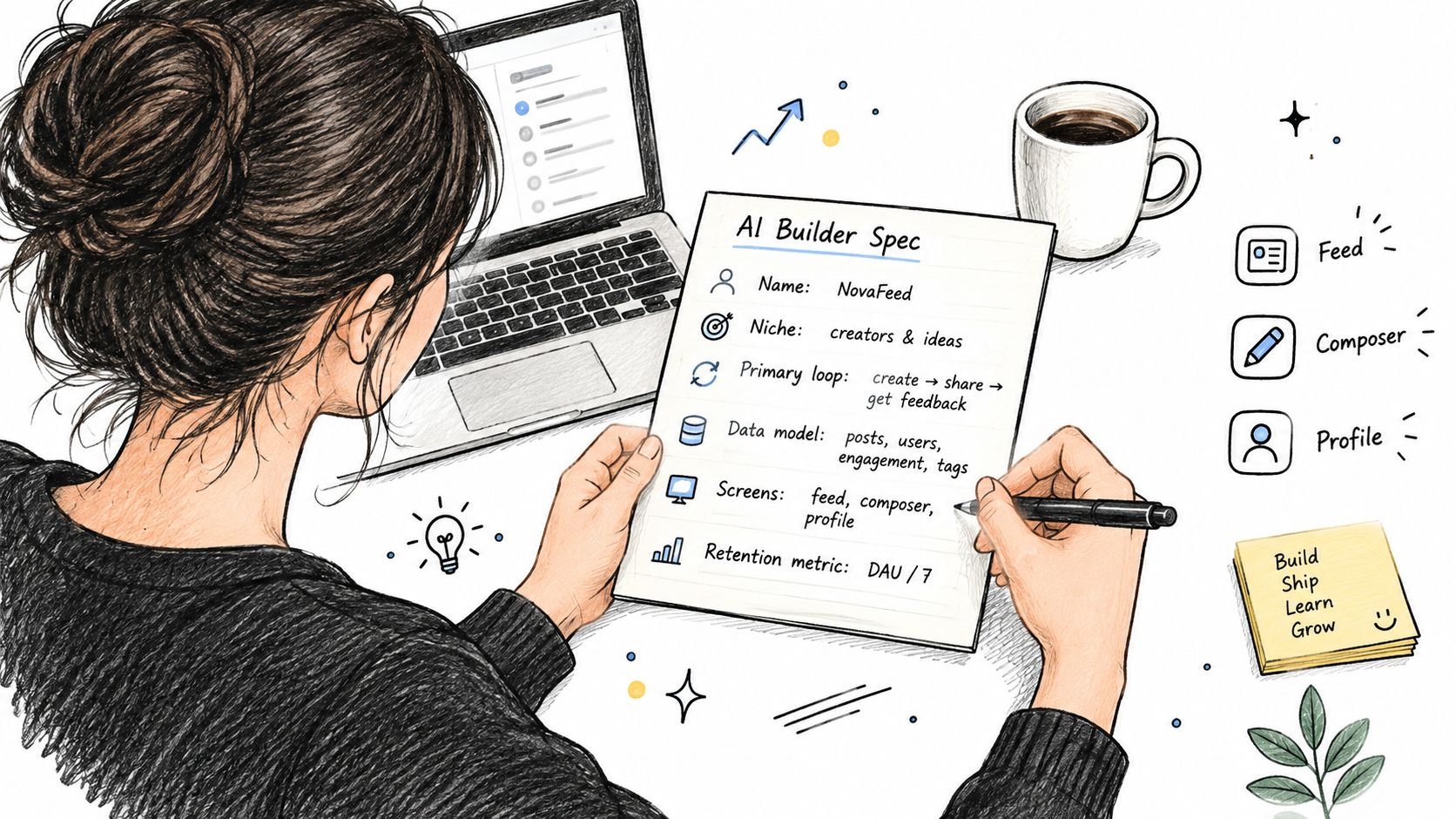
An AI builder produces a usable app when you give it a product contract, not a mood board. Every first prompt needs three things: one social loop, five data tables, and three screens.
The screens are deliberately boring:
- Feed: Shows relevant posts, empty states, likes, comments, and notifications.
- Composer: Creates a post with validation and a clear success state.
- Profile: Displays identity, user posts, and the follow action.
Use this prompt structure:
App name: [name]
Niche: [specific community]
Primary loop: [who posts, who watches, trigger, reply reason]
Data model: Users, Posts, Follows, Likes, Comments, Notifications. Define every field and relationship.
Screens: Feed, Composer, Profile.
Auth: Email and magic link.
Feed behavior: Reverse chronological posts from followed users and the public niche feed.
Retention metric: Time-to-first-meaningful-interaction, measured from completed signup to first follow, message, comment, like, or post.
Constraints: Responsive web app, accessible controls, duplicate-handle validation, empty feed state, report button, and clear error messages.
For a running-club app, write something like this:
Build a responsive web app called RouteTalk for local runners. The primary loop is: a runner posts a completed route with a short note, nearby runners view it, and another runner replies with route advice or an invitation to run. Create Users, Posts, Follows, Likes, Comments, and Notifications tables. User fields are id, email, handle, bio, avatar, and createdAt. Post fields are id, authorId, body, mediaUrl, routeName, createdAt, and visibility. Follow joins followerId and followeeId. Likes join userId and postId. Comments belong to posts and users. Notifications store recipientId, actorId, type, postId, readAt, and createdAt. Create Feed, Composer, and Profile screens. Use email magic-link auth. Show a helpful empty state when a new user has no posts or follows, suggest sample running topics, and provide a button to create the first route note. Reject duplicate handles with an inline message. Prevent duplicate likes. Add notifications for follows, likes, and comments. Measure time from signup to first meaningful interaction.
Don't paste a 2,000-word product brief into the first request. The builder will satisfy the longest list, not the most important behavior. Don't ask for a TikTok clone either. That phrase hides ranking, media processing, moderation, creator incentives, and abuse prevention behind a familiar name.
After the first output, iterate in a fixed order:
- Feed ranking: Confirm whose posts appear and why.
- Notification triggers: Test every event, including offline delivery.
- Empty states: Make the first screen useful before the community has content.
- Rate limiting: Restrict rapid posting, likes, and comments to reduce abuse.
For broader thinking about how AI changes product creation, designing the future with AI offers useful context. Keep your own build prompt narrower than the ideas it inspires.
Choosing the Backend and Integrations
Backend selection is a set of product decisions disguised as a technical decision. For a first social web app, use a relational database because users, posts, follows, likes, comments, and notifications have clear relationships.
Supabase on Postgres is a practical fit. It gives the builder structured tables, authentication, file storage, and row-level security. Row-level security matters because users shouldn't be able to edit another person's post by changing an identifier in a request. Tell the builder exactly who can read, insert, update, and delete each record.
Make the feed decision early
For early traction, use read-time querying. The app can fetch recent posts from followed users and the public niche feed when someone opens the feed. This keeps the logic visible while you're still learning which content matters.
Once the app has hot users whose posts attract large audiences, ask the builder to evaluate precomputed fan-out. That approach writes feed entries ahead of time for recipients, which can reduce expensive reads but adds storage, retry, and consistency logic. Don't build it because a technical article mentions scale. Build it when your access pattern proves the need.
Real-time features need two delivery paths. Use WebSockets for foreground in-app updates such as live likes, comments, presence, and acknowledgements. Use push notifications for background delivery. The WebSocket notification architecture guide describes the practical pattern: event ingestion, message routing, channel dispatch, per-user notification storage, delivery analytics, and offline recovery. Short polling is the wrong default for always-on interactions, and WebSockets without a fallback lose events when users disconnect.
| Concern | Recommended Tool | Why It Fits v1 |
|---|---|---|
| Database and auth | Supabase with Postgres | Relational data, authentication, storage, and row-level security |
| Feed | Read-time query | Simple to inspect while the social loop is unproven |
| Live interaction | WebSockets | Bidirectional updates for active sessions |
| Background return path | OneSignal push notifications | Reaches users when they're offline |
| Payments | Stripe | Suitable for subscriptions or tipping |
| Advertising | AdMob | Relevant when an ad-funded mobile path is intentional |
| Database planning | Supabase schema guidance | Keeps relationships explicit and exportable |
If you need to understand how people manage multiple social identities and accounts, LineVerifier's social media guide is useful operational context. It also reinforces why account boundaries and notification routing shouldn't be improvised.
Write one sentence for every integration. “Use Supabase for auth and relational data. Use OneSignal for background notifications. Use Stripe for subscriptions.” That is enough for the builder to create a coherent first pass. For a deeper database-specific implementation reference, see this guide to databases for apps.
Testing and Launching Your Social App
A social app isn't launched when it compiles. It's launched when real people post, comment, and return without you standing beside them.
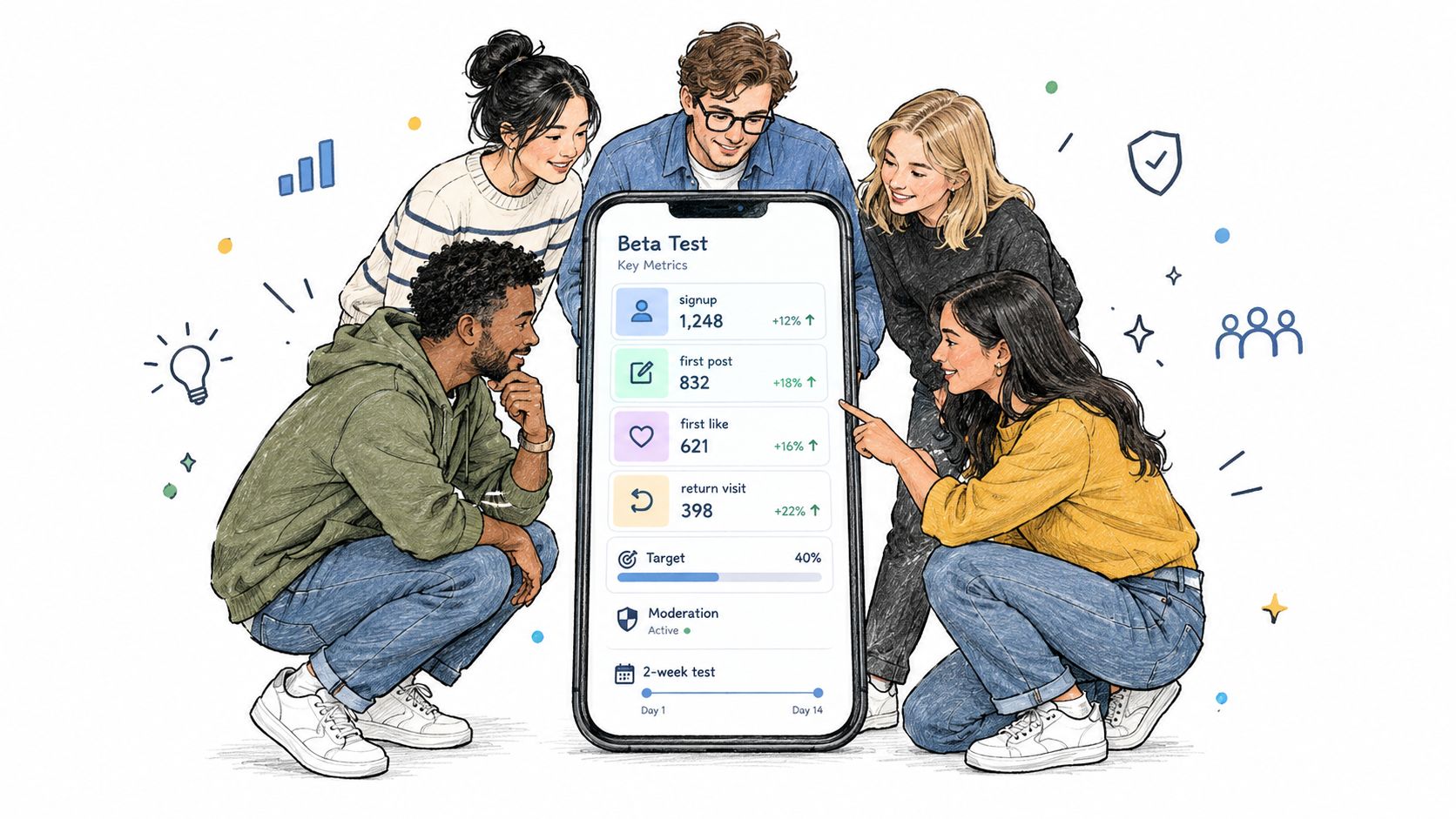
Run a private beta with twenty real users from your target niche for two weeks. Those users need to resemble the people you want, not your friends who already understand the idea. Observe where they stop. Ask what they expected to see, what they wanted to post, and whether the first feed gave them a reason to interact.
Instrument these events from the first build:
- Signup completed: The account exists and the user reaches the app.
- First feed view: The user sees content or a useful empty state.
- First post: The user creates the core object.
- First like received: Someone else reacts to that post.
- Return visit: The user comes back without a personal reminder from you.
If fewer than 40 percent of test users post once, treat that as a broken loop, not a cosmetic issue. The cited benchmark comes from your beta criterion, not a universal law. Investigate the prompt, onboarding, feed content, and posting trigger before adding another feature.
Test trust before reach
Write a short moderation policy before inviting the public. Cover spam, hate, and impersonation in plain language. Then tell the builder to add a profanity filter and a report button that creates a moderation queue. You need a way to respond when the first bad post appears, not a promise that you'll handle it later.
Privacy also belongs in the first release. GDPR applies to platforms processing EU users' personal data regardless of where the company is based, and published social-platform guidance calls for clear moderation policies, explicit informed consent, TLS 1.2 or higher in transit, and strong password hashing such as bcrypt or Argon2 instead of MD5 or SHA-1, as outlined in this social media app security and technology guide.
Run a 24-hour soak test with a friend in another country. Check timestamps, notification delivery, daylight-saving behavior, duplicate events, and offline recovery. Then publish to a real domain with your builder's one-click deployment, connected to a custom URL and SSL.
Before public invitations, require two practical checks:
- Feed response: The feed loads in under one second on 4G.
- Notification return: The notification path brings a user back inside ten minutes.
Use this timeline that survives rollouts when planning changes after the beta. Keep releases small enough that you can identify which change affected behavior.
Why Webtwizz and What to Do Today
The wrong AI builder gives you an impressive first screen and a future ownership problem. You discover that your data, users, payments, or source code live inside a platform you can't easily move. For a social product, that trade is especially dangerous because the network effect is your moat, while portability is your insurance.
Terms vary across tools. A 2026 review of major AI app builders found that source-code export is usually paid, while free tiers often restrict build credits and custom domains, according to this review of AI app builder terms. Another comparison notes that v0's free plan includes GitHub sync, is capped at 7 messages per day, and provides $5 of monthly credits, as documented in this AI app builder comparison. Those constraints can determine whether you're building a shippable product or renting a temporary prototype.
Choose your builder against four questions:
- Can you export the source code? If the answer is unclear, assume switching will be painful.
- Can you keep your data outside the builder? Your users and posts should live in infrastructure you control.
- Can you predict usage costs? A social app generates iteration and activity, so unpredictable credits can interrupt development at the worst time.
- Can you change the schema through conversation? Your first feed model won't be your final one. You need to revise tables, permissions, ranking, and notifications without rebuilding the project.
Webtwizz fits this workflow because it creates a working web app from plain-language descriptions, publishes a real web app with authentication and a database, and supports real data through Supabase or its built-in CMS. It also focuses on source-code ownership, predictable credits, and one-click publishing, which are more important for a social product than merely producing a fast mockup.
Your plan for this week is concrete. Write the one-sentence social loop. Add the User, Post, Follow, Like, Comment, and Notification shapes. Paste the full specification into the builder. Generate the feed, composer, profile, auth, and notification path. Then put the working app in front of five people who match your target user before you spend time on marketing or visual polish.
Use Webtwizz to turn your scoped social loop into a working web app with authentication, database-backed features, deployment, and conversational iteration. Start today by pasting your one-paragraph app description and the v1 data model, then send the first build to five target users.
Last updated: September 18, 2026