
At 6:10 p.m., your inbox is full of messages asking whether Tuesday is available. You add one client to the calendar, discover another booking already occupies the same time, then spend the evening confirming details that a real appointment scheduling app should handle automatically. The next morning, a no-show leaves an expensive gap in the day.
You don't need to hire a developer to fix that workflow. A focused web app can give customers a branded booking experience, protect every slot at confirmation, collect deposits, and continue capturing demand after your office closes. The important part is building a real scheduling system, not generating a polished calendar mockup.
Why Build Your Own Appointment Scheduling App
A standard booking link solves the easiest version of scheduling. It shows availability, collects a name, and creates an event. That can be enough for a solo consultant with one meeting type, but service businesses usually need more control over the booking funnel.
The category has become substantial enough to support standalone products. One independent estimate puts the global appointment scheduling market at US$342.3 million in 2023, rising to US$386.7 million in 2024 and projected to reach US$803.7 million by 2030, with an estimated 13.8% CAGR. MarketsandMarkets reports on the appointment scheduling market presents that growth as a signal that scheduling is becoming workflow infrastructure across healthcare, services, and other appointment-heavy industries.
The limits of a generic booking link
Three problems usually push founders toward a custom appointment scheduling app:
- Branding limits: A third-party page can make your service look interchangeable with every other booking page. Your own app can put the offer, proof, pricing, intake questions, and confirmation experience in one controlled flow.
- Weak concurrency protection: A visual slot lock isn't enough. Two customers can still attempt to confirm the same time unless the server checks availability at the exact moment of booking.
- Payment friction: Sending a customer to a separate payment tab adds another handoff. If you need deposits, payment holds, cancellation rules, or an upsell before confirmation, owning the flow gives you more useful control.
The opportunity isn't merely to replace a calendar. It's to own the moment when interest becomes a confirmed appointment, along with the customer data and the next relevant offer.
A useful comparison is this Microsoft Bookings alternative, especially if you're evaluating whether an off-the-shelf scheduler gives you enough control. A custom build makes sense when your booking rules are part of the product itself.
The four-block test
Before opening an AI builder, define four blocks: the site shell, booking flow, calendar and payment plumbing, and the lifecycle layer. If one block is missing, you'll either lose conversions, create conflicts, or leave staff managing the same manual work in a different interface.
The Four Parts Every Scheduler Needs
Think of the app as four connected products rather than one page. Each block has a different job, and separating them makes the build easier to prompt, test, and repair.
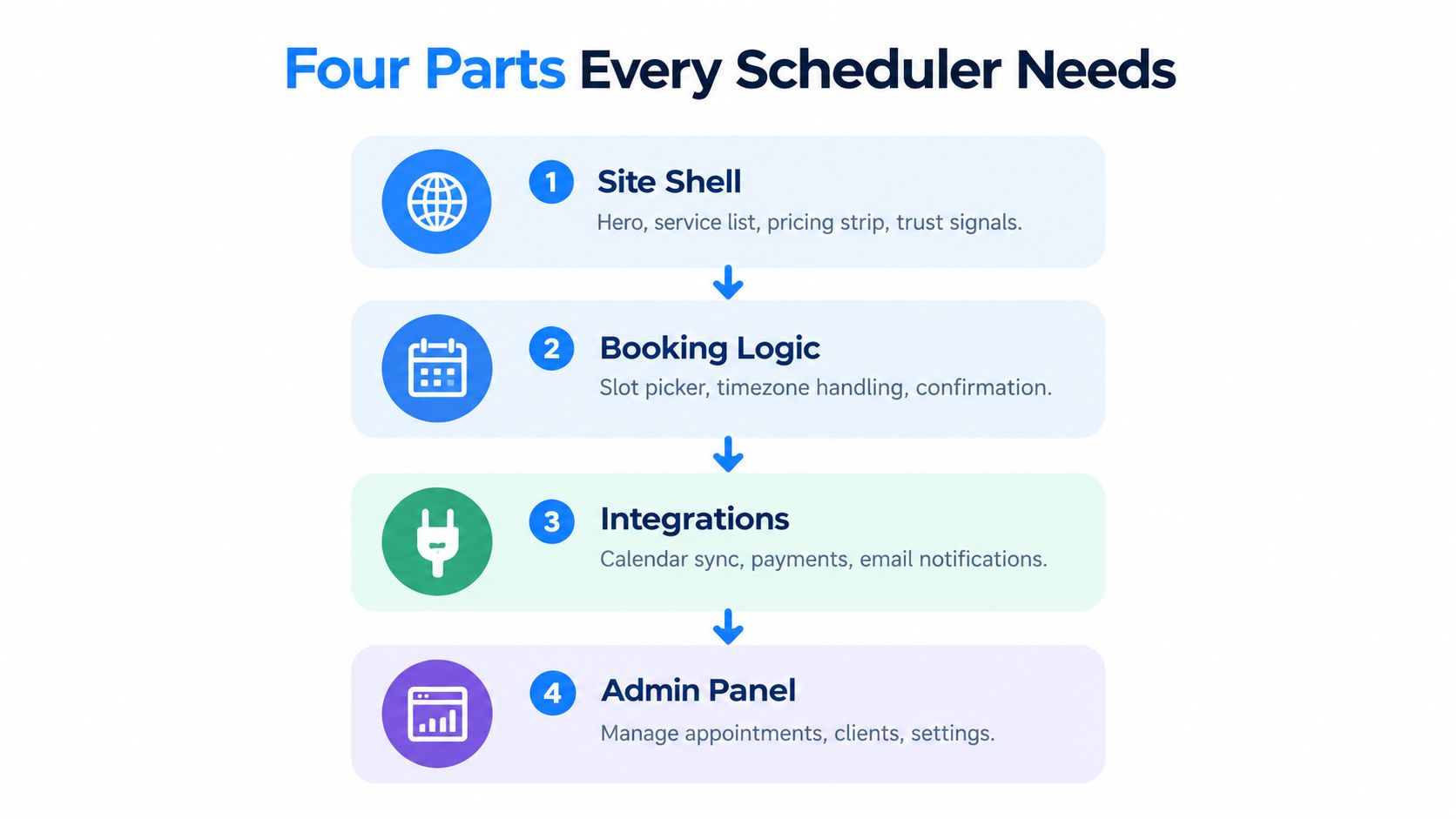
The site shell
This is the customer-facing page before anyone chooses a time. Generate a clear hero section, service list, pricing strip, and trust signals. The page should answer what the appointment is, who it's for, how long it takes, and what happens after booking.
Don't spend your first build on elaborate animation. A strong service card with duration, price, location, and a direct booking button is more useful than a decorative landing page that hides the next action.
The booking flow
The core journey should move through distinct states:
- Service picker: The customer chooses a service, provider if relevant, and any add-ons.
- Slot grid: The app displays available times using the selected service duration, buffers, timezone, and working hours.
- Intake form: Ask only for information that affects delivery, preparation, or compliance.
- Confirmation screen: Show the appointment details, payment status, calendar option, cancellation policy, and reschedule path.
A service-first flow usually works better than showing a giant calendar immediately. The selected service determines which slots are valid, so asking for the service first prevents confusing availability.
The plumbing
Calendar sync must reflect real availability, not a copied schedule. Add Google Calendar or Outlook connections, per-service working hours, blackout dates, buffers, and cancellation updates. Payment processing belongs before confirmation when a deposit is required.
The critical rule is server-side availability validation. The interface can display an open slot, but only the backend should decide whether the booking succeeds.
The lifecycle layer
A booking isn't complete when an event appears on a calendar. Confirmation emails, reminders, cancellation handling, rescheduling, no-show follow-up, and administrative alerts determine whether the appointment reaches completion.
A practical dashboard should track fill rate, third-next-available, no-show rate, cancellation rate, phone abandonment, and after-hours booking share. Scheduling literature commonly uses roughly 95% fill rate, about 7 days to third-next-available, and around 5% no-shows as healthy operational targets. Prosper's appointment scheduling guide also emphasizes that booking volume alone is a weak success measure if reminders and self-service don't support attendance.
Building It With an AI App Builder
Open Webtwizz and begin with the smallest complete customer journey. Don't ask for “a Calendly clone.” That phrase tends to produce a generic page with a calendar, weak data structure, and no clear path to production.
Use a seed prompt with constraints:
Build a working appointment scheduling web app for a service business. Create a branded site shell with a hero section, service catalog, pricing, trust signals, and a service-first booking flow. Use four linked pages: service selection, time-slot selection, intake details, and confirmation. Store services, availability rules, customers, bookings, and payments as separate records. Do not create a generic Calendly-style clone. Make the app ready for calendar sync, deposits, reminders, cancellation, rescheduling, and server-side double-booking prevention.
That prompt establishes the product shape and the data entities. It also tells the builder not to collapse everything into a single modal, which becomes difficult to wire once you add payments and conditional intake fields.
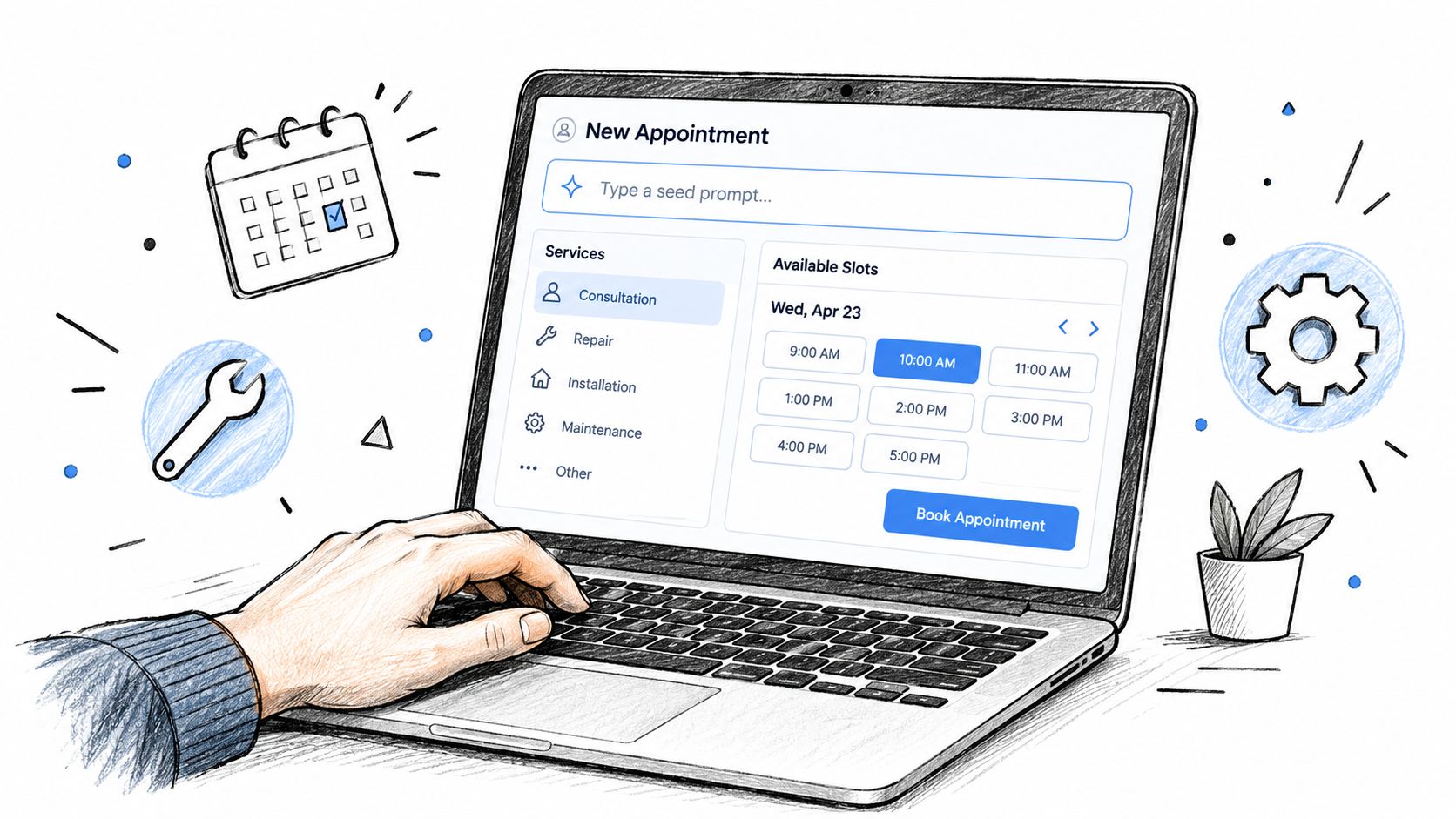
Refine the generated flow
Run refinement prompts one at a time so you can identify which change caused a regression:
- “Replace the default calendar-first flow with service selection first. Show duration, price, location, and available providers on each service card.”
- “Turn the booking experience into four linked pages, not a modal. Preserve selected service and slot data between pages.”
- “Rewrite the confirmation screen to show service, provider, local time, duration, payment status, cancellation policy, and reschedule action.”
- “Ask for only the intake answers needed for this selected service. Save answers against the booking record.”
The last instruction matters because different services often need different forms. A dental appointment may require insurance information, while a strategy call may need a business URL and meeting objective.
Keep automation outside the first visual pass. If you need to connect form submissions, reminders, or internal notifications to other tools, review resources such as Formbricks on automation platforms, but don't add integrations before the booking states are stable.
For a deeper builder workflow, see how to use an AI-powered no-code app builder. At this checkpoint, the site shell, service catalog, page transitions, and basic records should work. Calendar access, Stripe actions, notification hooks, and concurrency protection still need deliberate wiring.
Wiring Calendar, Payments, and Notifications
The appointment scheduling app stops looking like a prototype here. Generate each integration separately, then test the state change it creates.
Start with calendar access:
Add Google Calendar and Outlook OAuth connections. For each staff member, read busy events and combine them with service-specific working hours, blackout dates, minimum notice, and buffer time. Recalculate valid slots from the selected service duration. When an appointment is cancelled or rescheduled, update the host's primary calendar and release the old slot.
The application should store the booking's timezone and display times in the customer's local context while preserving the canonical appointment time for the host and calendar provider. Calendar sync is not a decorative integration. It is the source of truth that prevents the app from offering time the business can't deliver. This calendar integration guide is useful when you need to specify the connection behavior more precisely.
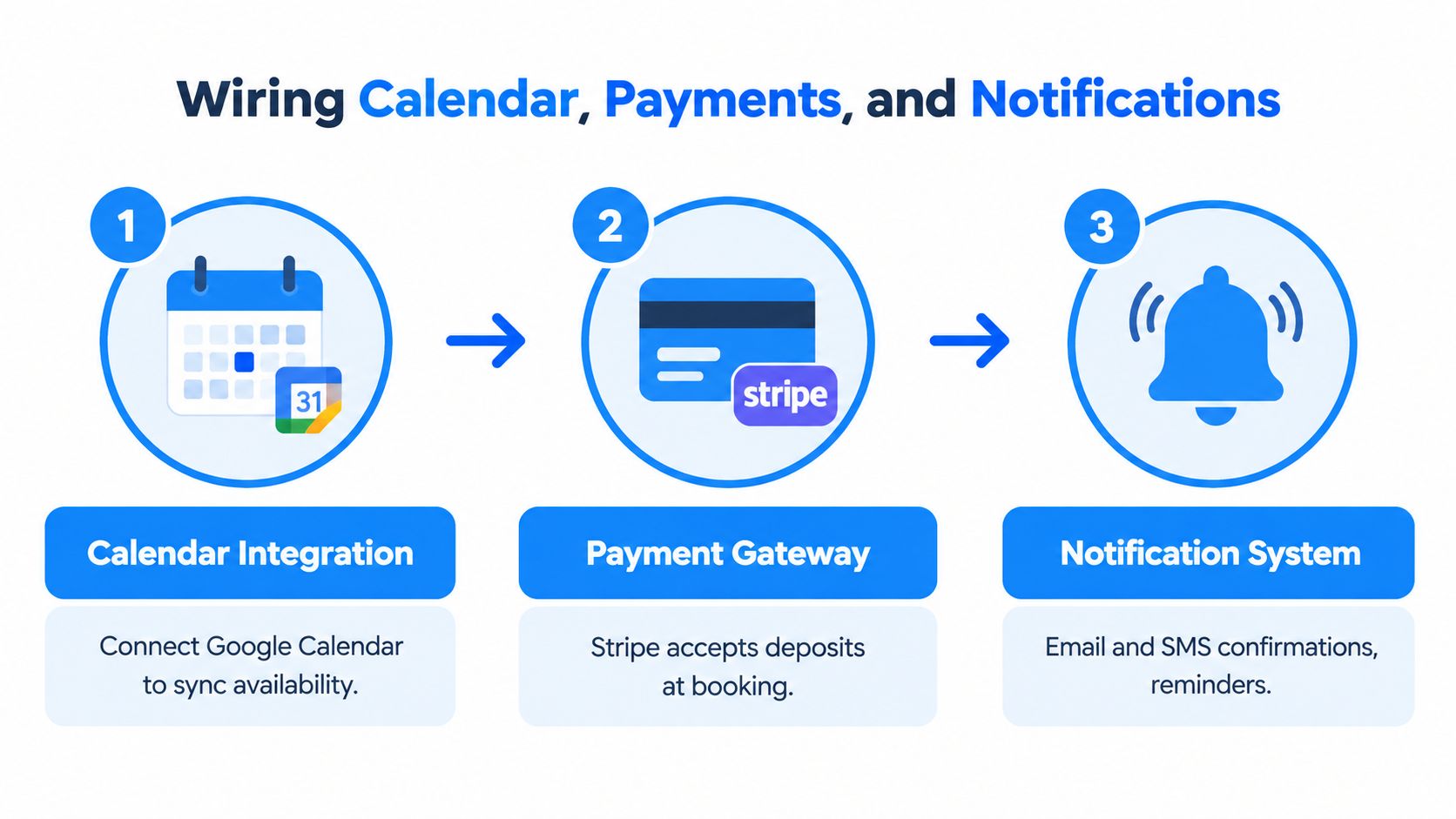
Put payment before confirmation
For deposits, ask the builder for an explicit state machine:
Add a Stripe deposit step before booking confirmation. Create a payment intent for the selected service and amount. Confirm the appointment only after successful payment. If payment fails, keep the slot unconfirmed and show a retry action. Add an optional no-charge hold for approved repeat clients, with an expiration timestamp and audit history.
A payment hold must not create a confirmed booking without clear indication. Use statuses such as pending, held, confirmed, cancelled, refunded, and expired. That distinction makes refunds, failed cards, and abandoned checkouts manageable from the admin panel.
Protect the confirm action
The most important prompt in the entire build is the concurrency rule:
At the server-side confirm action, recheck that the selected slot is still available for the service, provider, timezone, and duration. Lock or reserve the slot transactionally before creating the booking. If another booking won the race, return a clear failure message and offer refreshed alternatives. Never trust a client-side availability flag.
A retrospective study of 98,067 ophthalmology appointments found that online-booked appointments had a 1.8% no-show rate, compared with 5.9% for offline bookings. The same study reported unused slots falling from 22.7% to 10.3%, and never-booked appointments falling from 8.6% to 1.6%. Grand View Research's scheduling apps coverage gives the figures, which illustrate why booking-channel behavior and slot logic affect utilization.
Add reminders and after-hours capture
Use this prompt for notifications:
Send a confirmation email with appointment details, calendar invite, payment status, cancellation policy, and reschedule link. Send reminders 24 hours and 1 hour before the appointment using the booking timezone. Log delivery status and suppress reminders for cancelled appointments.
Then add a conversational fallback:
Add an after-hours chat widget that identifies service, preferred day, timezone, customer contact details, and booking intent. If live availability cannot be safely confirmed, create a pending request, queue it for staff review at 9 a.m., and email the customer a hold notice. Never represent a pending request as a confirmed appointment.
The workflow addresses the fact that 40% of appointments are booked after business hours, while the same dataset reports 54% of business-hours bookings happen on the go and identifies Sundays from 4 to 8 p.m. as peak booking times. LeadResponse's appointment scheduling statistics also discusses conversational booking and AI assistants as an emerging part of scheduling workflows.
Matching Features to Common Use Cases
The same appointment scheduling app shouldn't expose the same fields and rules to every customer. Choose two features to build first, then add one optional capability after the primary booking path works.
| Business Type | Build First | Nice to Have | Skip |
|---|---|---|---|
| Clinics and dental practices | HIPAA-conscious intake, appointment-linked forms | Insurance fields and SMS reminders | Deposits for insured visits |
| Salons and spas | Staff selection, service add-ons with extra duration | Packages and tipping at checkout | No-show fees for loyal repeat clients |
| Consultants and freelancers | Deposit or full payment, automatic video link | Post-session invoice | Staff switching |
| Coaches and course creators | Recurring slots, group capacity | Waitlist and required cancellation acknowledgement | Intake forms |
Healthcare needs a stricter data boundary than a coaching calendar. Appointment records may become protected health information, so the app needs encryption in transit and at rest, role-based access, strong authentication, and audit logs. Emitrr's HIPAA scheduling checklist covers those mechanics. Treat them as build requirements, not settings to add after launch.
A salon needs resource-aware duration. If a color service and an add-on both consume time, the slot calculation must include the combined duration before displaying availability. A consultant usually has a simpler catalog, but payment and video-link creation belong in the confirmation transaction.
Coaches should model capacity rather than individual availability. When a group session reaches capacity, the app should stop offering it or place the next customer on a waitlist. If you want a concrete starting point, use this salon booking app build as a reference for service and staff requirements.
After-hours conversations fit all four models, but they shouldn't bypass booking rules. An automated inquiry response system can capture intent, while your scheduler remains responsible for confirmed availability, payment state, and customer records.
Testing, Launching, and Fixing What Breaks
Don't launch after clicking through the happy path once. Use a test account, a real calendar connection in a safe environment, and payment test behavior before you allow customers to book.
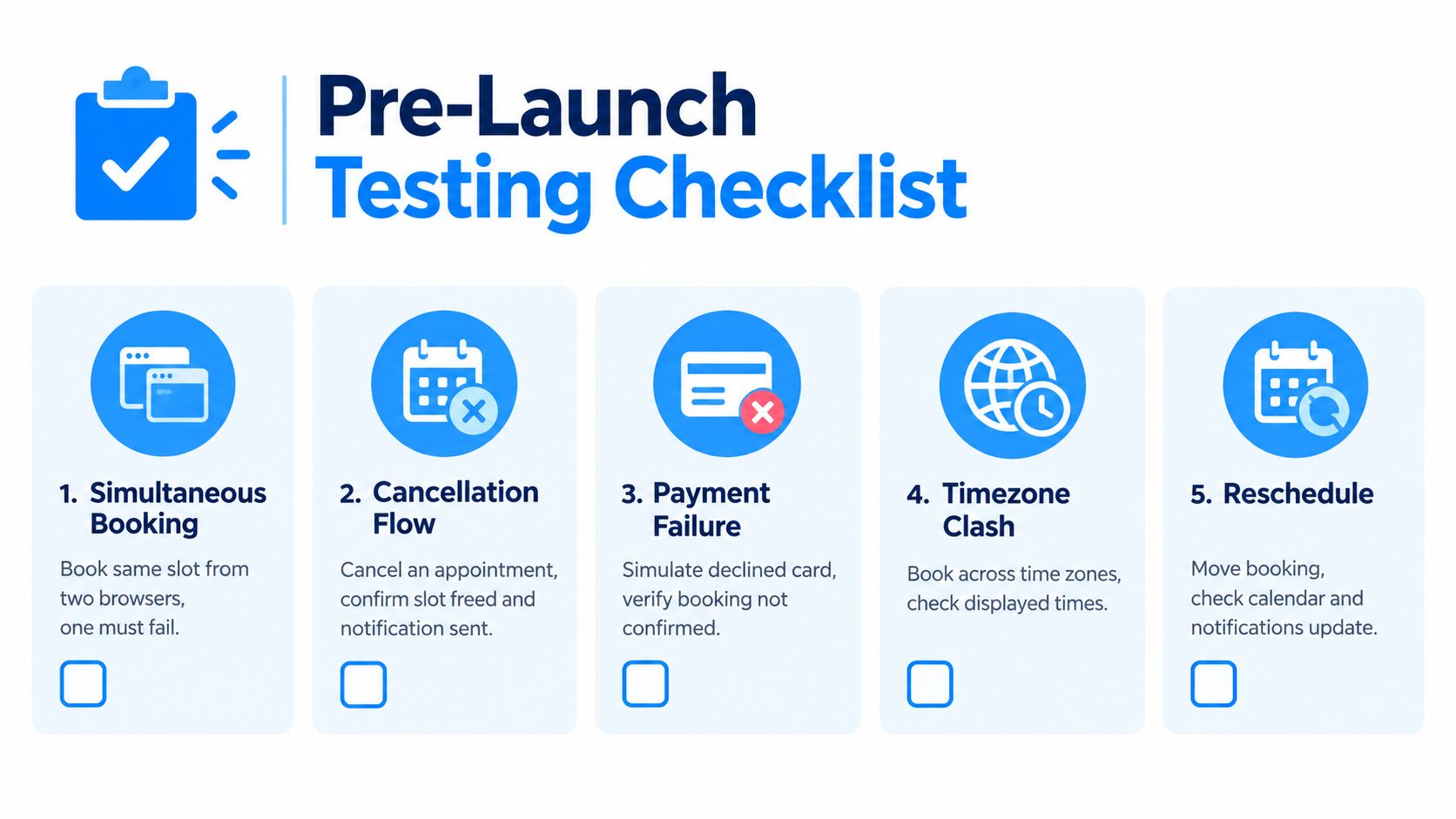
Run these cases deliberately:
- Simultaneous booking: Open two browsers and submit the same slot. One request must fail cleanly.
- Cancellation flow: Cancel an appointment, confirm the calendar frees the slot, and verify the customer and admin notifications.
- Payment failure: Submit a declined card and confirm that no appointment reaches confirmed status.
- Timezone clash: Book across timezones, then compare the customer display, host calendar, reminder text, and stored appointment time.
- Reschedule: Move the booking and verify that the old slot is released, the new slot is checked again, and notifications update.
The launch checklist
Before sharing the booking link, verify:
- Domain: Your custom domain resolves to the published app.
- Security: SSL is active and the browser shows a secure connection.
- Policies: Privacy policy and terms are linked from the booking flow.
- Payments: Stripe is in live mode only after test transactions pass.
- Operations: Admin alerts reach a real monitored inbox.
- Data: Customer, service, booking, payment, and audit records are visible to authorized staff.
The first week usually exposes edge cases involving shared calendars, payment retries, and timezone conversion. Send the AI builder targeted repair prompts instead of asking it to “fix scheduling”:
Prevent overlapping bookings when two staff members share a calendar. Recalculate availability from all connected calendars before confirmation and reject any overlap server-side.
Make Stripe webhook processing idempotent. Store the event ID, ignore duplicate event IDs, and update the booking only once when a retry arrives.
Store each appointment timezone explicitly. Render reminder times from that timezone, and test daylight-saving transitions without changing the canonical appointment timestamp.
These prompts name the failure condition and the expected behavior. That gives the builder a testable repair rather than an invitation to rearrange the interface.
Launching and Owning the App Long Term
A shipped scheduler is a living product. Review booking completion, refund spikes, cancellations, and no-show trends regularly, then adjust availability windows, payment rules, or reminder timing based on what customers do.
Don't optimize for raw booking count. A full calendar with poor attendance can hurt more than a quieter schedule with reliable completion. The operational metrics worth watching include fill rate, third-next-available, no-show rate, cancellation rate, phone abandonment, and after-hours booking share, which are also the measures recommended in primary-care scheduling methodology.
Three habits keep the app useful:
- Friday review: Check the next week's bookings, missing intake data, payment exceptions, and staffing conflicts.
- Monthly builder session: Ask the AI builder to improve one workflow, such as a clearer reschedule path or a service-specific form.
- Quarterly integration audit: Recheck calendar permissions, Stripe events, reminder delivery, and OAuth connections after provider changes.
Don't add features merely because the builder can generate them. Add the feature that removes a recurring manual decision or protects a confirmed appointment.
Open Webtwizz tonight, paste the seed prompt, and generate the booking page before analysis paralysis turns a focused build into another stalled idea. A custom scheduler can buy back your evenings, but only if you keep testing and improving it after launch.
Webtwizz lets you describe a working appointment scheduling app in plain language, including booking pages, services, availability, checkout, and reminders, then publish it as a real web app. Visit Webtwizz today, paste the first prompt, and build the four-page booking flow before adding integrations.
Last updated: September 23, 2026